A free Commander table · Now in beta

Your pod's table.
Free, forever.

Play Commander online with your pod, up to six seats. No camera, no account, nothing to pay. You host the table on your computer, and your friends join from a link. No internet? Host it on your Wi-Fi instead.

Only the host downloads. Everyone else plays in their browser.

Film coming soon Recorded from a real game on the real table.

01 · Free

Six seats.
Nothing locked.

Every feature, for every player, at every seat. No tiers, no trial, no sixth chair behind a paywall. Supporters chip in because they want to, and they get a thank-you, never a feature.

Seven to ten seats are coming with 2.0 on February 23, 2027. Free, like everything else.

Seats at this table
Two seats.

02 · Easy to join

No camera.
No account.
Just a link.

The cards are digital, so there's no webcam to aim and no glare to fight. Nobody signs up for anything: you start the table, drop the link in your group chat, and friends sit down in their browser.

03 · Private

Your table.
Your door.

The door is locked every time you start. When someone wants a seat, you hear a knock, and they sit down only if you let them in. And if a computer crashes mid-game, the table was already saved: open it again and carry on.

Sam wants to sit in seat 3
Seat 1YouDinosaurs · host
Seat 2PriyaElves
Seat 3Open
Seat 4Open

Table saved a moment ago · Turn 1

Go on, answer the knock.

An honest comparison

Where each table shines.

Playgroup Live and TableCommander are good tables built for different things. Here's what each one offers, taken from its own website.

Spell Sanctum compared with Playgroup Live and TableCommander, checked September 2026
Feature Spell Sanctum Playgroup Live TableCommander
Price Free, nothing paywalled Free, with a paid supporter plan Free, with paid plans from about $4/month
Ads None Removed by the paid plan Removed by the paid plans
Account needed None, for anyone Yes, a free account Optional, guests can play
Seats 2 to 6, all free (up to 10 coming, also free) 2 to 6 2 to 6, six-player tables are paid
Spectators Free: anyone with your table's link watches your game live, no account, hands hidden Free, on public games, no account to watch Free, on public games
Voice chat Built in, free: push to talk or open mic, no account Built in, free On the paid plans
Your phone Holds your hand beside the table A phone board view An Android companion app
TV couch mode Yes Not listed Not listed
Host approves every seat Yes, the door is locked by default Host can kick and mute Not listed
Resume a stopped game Yes, autosaved as you play Yes Not listed
Undo Undo and redo Undo last action Not listed
Stats and ratings No Elo, per-deck stats, leaderboards Match history and stats
Find strangers to play Yes, optional public tables (beta): no account, and the host approves everyone Public lobbies A community lobby
Replays No Move by move, with a supporter in the pod Not listed
Offline mode Yes: on your Wi-Fi or a phone hotspot Not listed Not listed
Where the table runs On the host's computer On their servers On their servers

What's on the table

Everything paper has.
Plus what you wish it had.

At the table

Play it like paper.

  • Drag, draw, search, shuffle. Cards go where you put them, and your library behaves like a real one.
  • Tokens from the card. Right-click a card to make exactly the tokens it creates. Big piles fold into one card with a count die.
  • Counters you can read. Counters and keywords sit on the card, big enough to read from across the table.
  • Arrows for combat. Draw attacks, blocks and targets, then apply the damage summary in one click.
  • Cards that move. Draws, casts and bounces fly between zones, so everyone sees what just happened.
Clip coming soonCards drawn, played, tapped and sent into combat.

No internet? No problem

Wi-Fi down?
Game night isn't.

  • Play over any local network. A friend's living room with flaky internet, a game store, a weekend away, a convention hotel room. If everyone's on the same Wi-Fi or a phone hotspot, you're at the same table. Nothing leaves that network.
  • Your decks, saved ahead. Your local copy has room for 250 decklists. While you're online, tap Make available offline on a deck, or Get every deck ready to do the lot. Friends can save theirs to the table on an earlier game night.
  • Find the room in seconds. Friends scan a code or pick your room from Find a table nearby, type the four-digit PIN, and sit down.
  • Locked to your group. The PIN is checked on your computer only, and other tables on the same Wi-Fi can't get in.
  • No install for friends. They play in their browser, and on a phone it opens a view sized for the whole game.

The host's computer runs the table, and some venue Wi-Fi keeps devices apart. A phone hotspot fixes that.

Take a seat

Friday Night PodOn this Wi-Fi · the purple crown

Friends scan the code above, or open this in their browser:

192.168.1.24:3000

PIN4827

An example room. Each table gets its own address and PIN.

Couch mode

The power is in your hand.

  • Your phone is your hand. Scan the QR code and your hand moves to your phone: cast, search, count and tap from the couch.
  • The table on the TV. Open the TV view on the big screen for the whole room. Hands never show there.
  • Picks up where you left it. A phone that falls asleep keeps its seat and carries on when you unlock it.
Clip coming soonA hand on the phone, cast onto the table.

Commander tools

Built for the format.

  • Commander damage, tax and the command zone. Tracked for every commander at the table.
  • A deck check for Rule 0. Loading a deck shows its bracket floor, its Game Changer count and any banned cards. It warns; it never blocks.
  • Monarch, initiative and more. The monarch, the initiative, day and night, the Ring, dungeons and emblems all have a place.
  • Linked exile. A card exiled “until this leaves” remembers what took it, and offers to come back when it goes.
  • Bounties. Post a side objective on a player and let the table race to claim it.
Clip coming soonA deck checked on import, commander damage ticking up.

Never lose a game

Crashes happen.
Games don't end.

  • Autosave. The whole table saves to your computer as you play.
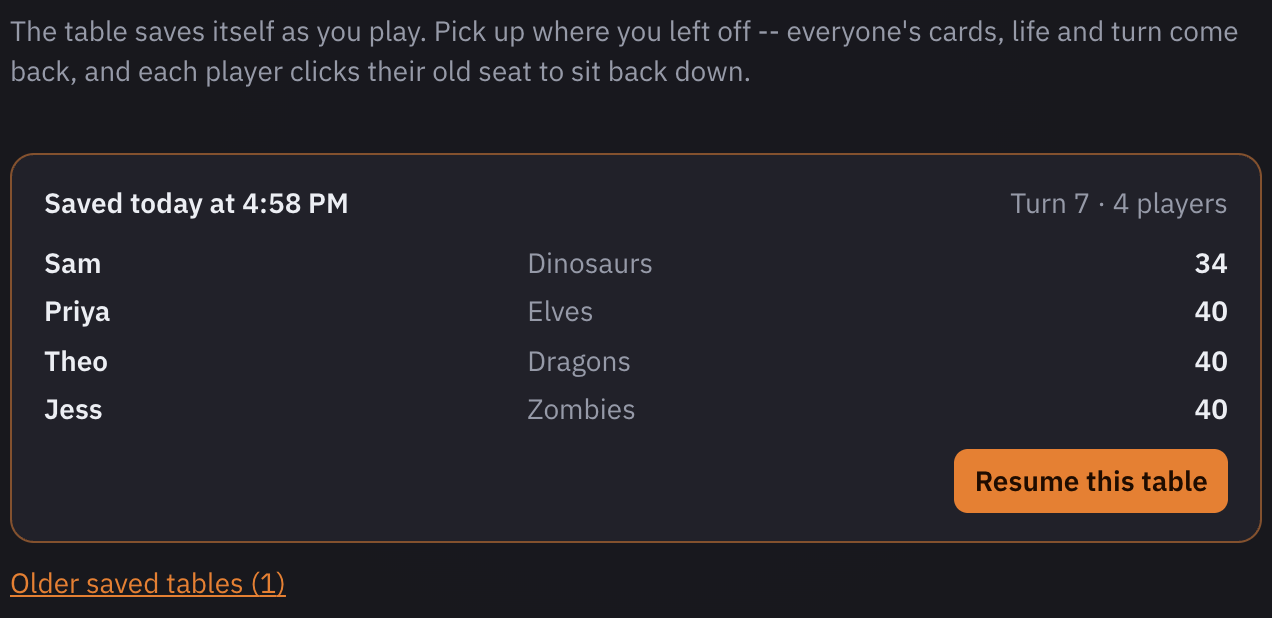
  • Resume. Reopen any of your last 20 tables, and everyone clicks back into their seat.
  • Undo and redo. Take back a misplay, even a whole mulligan, with Ctrl+Z or Cmd+Z.
  • Stays awake. Your computer won't doze off while it's hosting.
Spell Sanctum's setup screen offering to resume the last saved table: saved today, turn 7, four players with their decks and life totals, and a Resume this table button.
Close the window, come back tomorrow: cards, life and turn are right where you left them.

Hosting

Run the night your way.

  • The door. Locked by default. You approve every seat, and you can free one at any time.
  • Your Discord, linked. Paste your channel's webhook once, and the table's link posts itself there every time you start.
  • Stream mode. A delayed link for OBS, so your stream never shows a play before it happens.
  • Turn to-do list. Reads your cards' “at the beginning of” triggers so nobody forgets their upkeep.
  • Hold on. One tap asks the table to wait before the turn moves on.

Voice chat is built in too. Hold Z to talk, and a green ring shows who’s talking.

Clip coming soonA knock at the door, a seat filled, a stream link made.

Spectating

Sit one out. Still see it all.

  • Watch without a seat. Open the table's link and pick “Watch the table”. No seat, no deck, nothing to install.
  • Room for the whole group. When every seat is taken, the seventh friend still watches the game live.
  • Sit a game out. Leave your seat and watch the next game, then take a seat again when you're ready.
  • Hands stay private. Watchers see the board, the life totals and every play, never anyone's hand.
Clip coming soonA full table, a friend who just wants to watch.

How it works

Three steps to a full table.

  1. Download it.

    The host installs Spell Sanctum on a Mac or a Windows PC. One person, one time.

  2. Open it.

    Open it like any app. Your table opens in its own window and its link is copied for you.

  3. Send the link.

    Paste it to your pod. Friends open it in their browser and knock. Nothing to install, nothing to sign up for.

Community

Built with the people who play on it.

The Discord

Get help, report a bug, suggest what comes next and catch the news. Joining is optional: the app never needs it.

Discord opens soon

Ideas from anyone

Anyone can suggest what comes next, and supporters vote on the roadmap. Whatever gets built ships free to every player.

Shipped from your suggestions

Every update's changelog credits the players whose ideas made it in.

Support

Free forever. Kept going by the people who love it.

Nothing in Spell Sanctum is locked, and nothing ever will be. If it becomes your pod's table and you'd like to help, supporters fund development. The first goal is code-signing, so the Mac app opens normally and Windows shows who made it.

Pull up a chair.

Free. No accounts. No ads.